
Work Time Tracker1.1.1 - Google Play
You'll be able to see results in few seconds.
Publisher Description
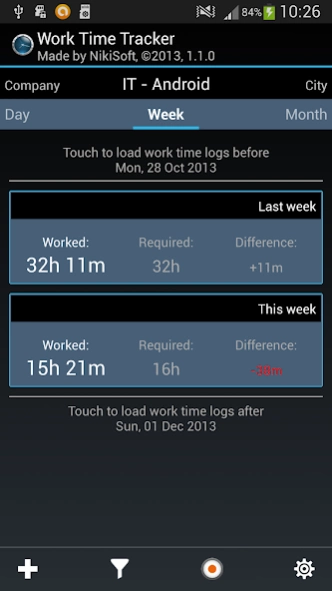
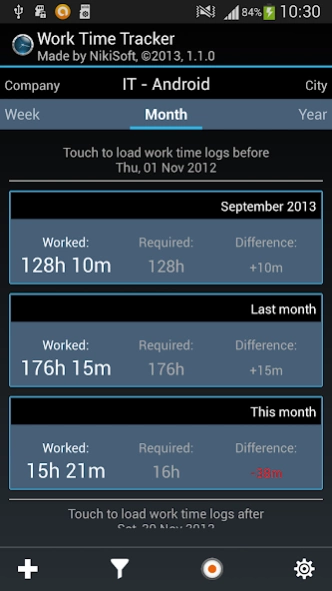
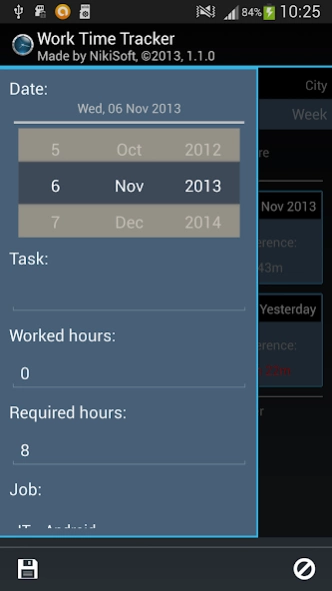

Simple way to keep track of amount of worked hours
Are you working variables hours? Do you never know at the end of the month if you worked enough hours?
STOP LOOKING!!! YOU HAVE FOUND AN APP WHICH SATISFIES YOUR NEEDS.
My app will help you track how many hours you have worked per day. Tracking of worked hours is provided through
2 simple ways. First way is to enter manually the amount of worked hours. The second one is to use built-in recorder,
which allows to start, stop, pause and restart recording of your working time. The recorder works even if you are not
using the app.
Each work time log is bound to a task. You can either create a 1 task per day, which holds the amount of worked hours or you can create unlimited tasks per day and each task will have its own name
Also if your are a manager, you can use the app to manage working hours of your employees. Simply, when
creating jobs, enter the name of the person in the field provided for a the name of the job.
My app offers you a simple home screen widget which displays the amount of worked hours per current week or current
month or current year. I hope the widget will help you to keep track of amount of worked hours.
Main features:
- simple way of entering the amount of worked hours
- 4 different lists:
- Day - shows amount of worked hours per day
- Week - shows amount of worked hours per week
- Month - shows amount of worked hours per month
- Year - shows amount of worked hours per year
- a filter, which helps you to display only data which you are interested in
- 3 different settings:
- set starts of week to Monday or Sunday
- format of displayed hours, either as decimal number or in format of hours and minutes
- default amount of required hours per day
- separate screen for displaying tasks
- you can choose a wide range of days and the all tasks associated with selected days will be displayed
- edit multiple tasks at once
- delete multiple tasks at once
- THE BEST AS LAST - simple way to track your amount of worked hours:
- simple press a button to start tracking
- pause tracking any time(e.g. having a break) and restart recording again(e.g. when you finish
your break)
- stop tracking anytime - app takes care to store and show your tracked hours.
- BONUS:
- a home screen widget which shows you a short summary of worked and required hours and the
difference between them.
- 3 different types of widget:
- Weekly - displays a weekly summary of current week
- Monthly - displays a monthly summary of current week
- Yearly - displays a yearly summary of current week
About Work Time Tracker
The company that develops Work Time Tracker is NikiSoft. The latest version released by its developer is 1.1.1.
To install Work Time Tracker on your Android device, just click the green Continue To App button above to start the installation process. The app is listed on our website since 2013-11-16 and was downloaded 0 times. We have already checked if the download link is safe, however for your own protection we recommend that you scan the downloaded app with your antivirus. Your antivirus may detect the Work Time Tracker as malware as malware if the download link to nikisoft.apps.worktimetracker is broken.
How to install Work Time Tracker on your Android device:
- Click on the Continue To App button on our website. This will redirect you to Google Play.
- Once the Work Time Tracker is shown in the Google Play listing of your Android device, you can start its download and installation. Tap on the Install button located below the search bar and to the right of the app icon.
- A pop-up window with the permissions required by Work Time Tracker will be shown. Click on Accept to continue the process.
- Work Time Tracker will be downloaded onto your device, displaying a progress. Once the download completes, the installation will start and you'll get a notification after the installation is finished.
Program Details
System requirements
Download information
Pricing
Version History
version 1.1.1
posted on 2013-11-16
New features in 1.1.1:,- edit saved work time log(amount of required hours and assignment to a job),- copy and move of one or more work time logs to different date at once,- copy and move of one or more tasks to different date at once,Fixed bugs:,- only tasks assigned to currently selected job will be displayed in tasks list screen,- tasks list screen shows the name of the job,- couple of other minor bugs which caused crash of the app
Disclaimer
Official Google Play Link
We do not host Work Time Tracker on our servers. We did not scan it for viruses, adware, spyware or other type of malware. This app is hosted by Google and passed their terms and conditions to be listed there. We recommend caution when installing it.
The Google Play link for Work Time Tracker is provided to you by apps112.com without any warranties, representations or guarantees of any kind, so access it at your own risk.
If you have questions regarding this particular app contact the publisher directly. For questions about the functionalities of apps112.com contact us.
